
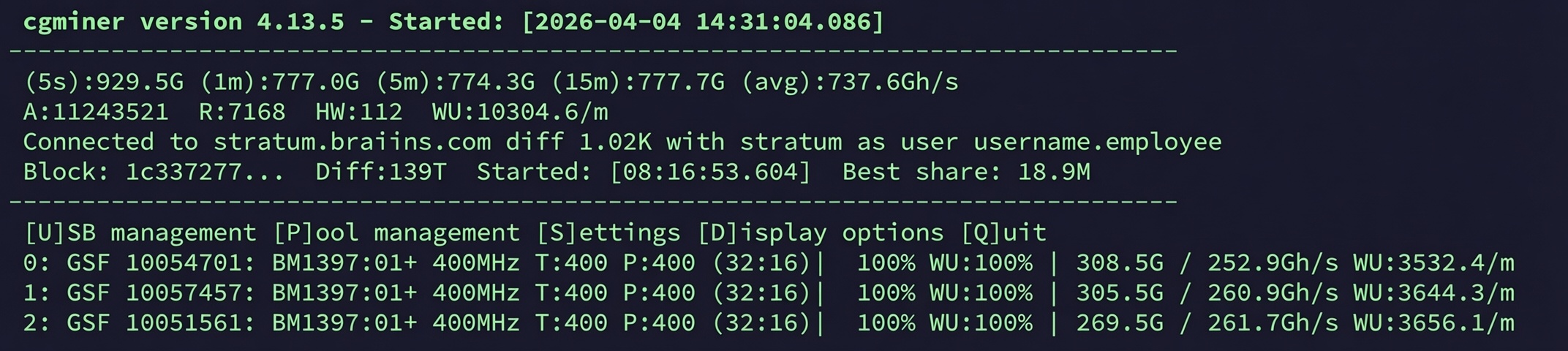
TL;DR: To support the launch of the new GekkoScience Compac A2, Kano released cgminer-gekko v4.13.5 in late October 2025. The release introduces support for the Compac A2 with Bitmain BM1370 ASIC (7 nm, up to 1 TH/s), keeps full backward compatibility with the R909 and Compac F, and adds three major new features: a per-API adjustable core voltage, automatic safety shutdown on chip overtemperature, and a live display of temperature and per-chip voltage right inside the CGMiner terminal. This article walks you through installation, configuration and tuning of cgminer-gekko v4.13.5 for the Compac A2.
What’s new in cgminer-gekko v4.13.5?
cgminer-gekko v4.13.5 is the official mining software for all GekkoScience USB-stick and pod miners. It is maintained by Kano in the repository https://github.com/kanoi/cgminer. Version v4.13.5 was built specifically for the launch of the Compac A2 and supersedes v4.13.1 (Compac A1).
Key new features at a glance:
- Support for the GekkoScience Compac A2 with Bitmain BM1370 ASIC (single-chip, 7 nm).
- Core voltage (CoreV) adjustable via the Java API using the new command
ascset|0,corev,<mV>. - Real-time temperature protection: the miner stops automatically if the chip temperature gets too high and restarts as soon as it cools down.
- Live display of the ASIC temperature and per-chip voltage right in the CGMiner terminal (example:
47C 270mV). - New API command
zeromaxtto reset the recorded maximum chip temperature. -
--gekko-mine2is now ignored – the optimized mine2 engine is the default for all Gekko miners.
Full backward compatibility: v4.13.5 still supports the Compac A1, Compac F and Terminus R909 out of the box.
Installation and Update of cgminer-gekko v4.13.5
Detailed step-by-step installation guides for each operating system are available in our support section:
CGMiner Gekkoscience Branch – Git Repository
The official Git master is maintained by Kano at: https://github.com/kanoi/cgminer. It is a maintained fork of the original CGMiner by Con Kolivas. Always download from the official repository – third-party forks (e.g. wareck/cgminer-gekko) have known security issues and must be avoided.
Build on Linux / Ubuntu / Raspberry Pi (Update)
sudo apt-get update
sudo apt-get upgrade -y
cd ~/cgminer
git pull
CFLAGS="-O2 -march=native -fcommon" ./autogen.sh --enable-gekko --enable-icarus
make clean
make
sudo apt-get install -y openjdk-8-jre-headless
Fresh install on Linux / Ubuntu / Raspberry Pi
sudo apt-get update
sudo apt-get upgrade -y
sudo apt-get install -y build-essential autoconf automake libtool pkg-config \
  libcurl4-openssl-dev libudev-dev libusb-1.0-0-dev libncurses5-dev zlib1g-dev git
cd ~
git clone https://github.com/kanoi/cgminer.git
cd cgminer
CFLAGS="-O2 -march=native -fcommon" ./autogen.sh --enable-gekko --enable-icarus
make
sudo apt-get install -y openjdk-8-jre-headless
Windows 10/11 (32-bit binary)
The precompiled Windows binary (v4.13.5) is available directly from Kano: https://kano.is/cgminer.php.On Windows, install the USB driver via Zadig (details in the README in the CGMiner repository).
macOS (Intel & Apple Silicon)
The macOS build guide (tested on Big Sur and later, both Intel and M1/M2/M3) is at https://github.com/kanoi/cgminer/blob/master/mac-build.txt.
Running CGMiner
Linux
./cgminer -o stratum+tcp://stratum.kano.is:3333 -u 1BURGERAXHH6Yi6LRybRJK7ybEm5m5HwTr -p x --suggest-diff 442or
./cgminer -c gekko.confWindows
cgminer.exe -o stratum+tcp://stratum.kano.is:3333 -u 1BURGERAXHH6Yi6LRybRJK7ybEm5m5HwTr -p x --suggest-diff 442or
cgminer.exe -c gekko.confmacOS
cgminer -o stratum+tcp://stratum.kano.is:3333 -u 1BURGERAXHH6Yi6LRybRJK7ybEm5m5HwTr -p x --suggest-diff 442or
cgminer -c gekko.confIn all examples, replace 1BURGERAXHH6Yi6LRybRJK7ybEm5m5HwTr with your own benutzername.worker on the pool. If you want to donate hashrate (or Bitcoin) to Sidehack (GekkoScience), feel free to keep the address 1BURGERAXHH6Yi6LRybRJK7ybEm5m5HwTr .
Sample gekko.conf for the Compac A2
{
  "pools" : [
    {
      "url"  : "stratum+tcp://stratum.kano.is:3333",
      "user" : "benutzername.worker",
      "pass" : "x"
    }
  ],
  "gekko-compaca2-start-freq" : "300",
  "gekko-compaca2-freq"       : "300",
  "gekko-compaca2-corev"      : "270",
  "gekko-compaca2-detect"     : true,
  "gekko-r909-freq"           : "450",
  "gekko-r909-detect"         : true,
  "gekko-compacf-freq"        : "400",
  "gekko-compacf-detect"      : true,
  "gekko-tune2"               : "60",
  "suggest-diff"              : "442",
  "failover-only"             : true,
  "api-listen"                : true,
  "api-port"                  : "4028",
  "api-allow"                 : "W:192.168.1.0/24,W:127.0.0.1"
}
Replace benutzername.worker with your own pool account and adjust 192.168.1.0/24 to match your local network. If you run multiple CGMiner instances on the same host, give each instance its own API port (4028, 4029, …).
Frequency and Voltage Settings for the Compac A2
Default settings for each Gekko miner in v4.13.5:
| Miner | Start frequency | Frequency | Core-Voltage |
|---|---|---|---|
| Compac A2 (NEW) | 300 MHz | 300 MHz | 270 mV |
| Compac F | 200 MHz | 200 MHz | – |
| Terminus R909 | 400 MHz | 450 MHz | (pot, ~4,6 V) |
If you run multiple different Gekko miners on the same CGMiner instance, you can combine the frequency arguments:
--gekko-compaca2-freq 300 --gekko-compacf-freq 400 --gekko-r909-freq 450Use --gekko-compaca2-detect, --gekko-compacf-detect and --gekko-r909-detect to select which miners CGMiner should pick up. If you pass no *-detect option, all available Gekko miners are used.
You can also restrict CGMiner to specific miners by serial number:
--gekko-serial GS-10000001,GS-10000002The --gekko-tune2 60 option re-enables periodic frequency recalibration when environmental conditions improve (e.g. better cooling). The value 60 means “check once per 60 minutes”; valid range: 30–9999 minutes. Default: off.
First Tuning Steps for the Compac A2
Out of the box, the Compac A2 runs stable at 300 MHz / 270 mV ≈ 600 GH/s @ ~10 W (eco mode). To dial in higher hashrates, follow this sequence:
- Step frequency up by 25 MHz at a time as long as hashrate scales cleanly.
- If hashrate plateaus or drops: raise the core voltage by 5 mV at a time (max approx. 270 mV).
- Step frequency up by 25 MHz again.
- Keep an eye on chip temperature – it should not stay above approximately 70 °C.
- If the next CoreV step delivers no improvement or temperatures climb too high, step back one notch. That is your sweet spot.
Typical operating points for the Compac A2:
| Target hashrate | Frequency | Core-Voltage | Power | Use case |
|---|---|---|---|---|
| ~600 GH/s | ~300 MHz | 250 mV | ~10 W | Quiet, low-power 24/7 solo-lottery mining |
| ~800 GH/s | 400 MHz | 270 mV | 13–14 W | Factory setting, safe and stable |
| ~1 TH/s | 500 MHz | 300 mV | 16–17 W | Maximum hashrate for solo mining |
Rule of thumb: Hashrate (GH/s) ≈ 2 × frequency (MHz).
Tuning Options via the API (Java)
All tuning options for the Compac A2 are controlled via the CGMiner Java API. This lets you build complex, sensor- or event-driven setups – for example coupling the miner to a PV system or home automation that does not need to run on the same controller as CGMiner itself.
Enable the API
--api-listen --api-allow "W:192.168.1.0/24,W:127.0.0.1"127.0.0.1 is the loopback address of the controller itself on which CGMiner is running. Adjust 192.168.1.0/24 to match your local network. When the API starts successfully you will see:
API running in IP access mode on port 4028 (10)Default port is 4028. With multiple CGMiner instances on one host, every instance needs its own port:
--api-listen --api-allow "W:192.168.1.0/24,W:127.0.0.1" --api-port 4029A Java installation is required on whichever machine queries the API. The Linux build steps above already install Java.
Read statistics
java API estats minerIPSample output from a live miner:
[STATS]       => 0
[Serial]      => GS-10008000
[WaitFactor0] => 0.500000
[WaitFactor]  => 2.000000
[Jobs]        => 10081/12972/12980/12972/12980
[JobsAvgms]   => 4.62/4.63/4.62/4.63/4.62
If you query from localhost, you can omit the IP:
java API estatsNEW in v4.13.5: set core voltage via AP
java API "ascset|0,corev,250" minerIPValid range: 0 mV to 500 mV. Kano’s recommendation: do not go above 270 mV. Useful values are 250–270 mV depending on your tuning goal and temperature.
NEW in v4.13.5: reset maximum temperature
The Compac A2 internally records the highest chip temperature ever measured and the time it occurred. You can reset that value via the API:
java API "ascset|0,zeromaxt" minerIPSet frequency for all chips (e.g. 400 MHz)
java API "ascset|0,freq,400" minerIPIf the frequency is not locked, the plateau code kicks in and tries to find the optimum automatically. Note for the Compac A2: Because the A2 has only one ASIC (BM1370), per-chip addressing (ascset|0,chip,0:410) ) does not apply to this miner – that option remains available for the R909 and Compac F.
Lock / unlock frequencies
java API "ascset|0,lockfreq"   minerIP
java API "ascset|0,unlockfreq" minerIP
CGMiner will no longer change the current frequencies automatically. If an ASIC stops responding (zombie), the lock is removed automatically and the miner is reset.
Reset on low hashrate
java API "ascset|0,require,0.65" minerIPBy default, the miner is reset when current hashrate stays below 65 % of the expected value. Valid range: 0.0 to 0.8. 0,0 disables automatic reset.
Wait factor (R909 / Compac F only)
java API "ascset|0,waitfactor,0.6" minerIPControls how often work is sent to the miner. Range: 0.01 to 2.0. Defaults: 0.5 (Linux), 0.4 (Windows), 0.3 (Mac). The Compac A2 does not need this adjustment.
USB propagation time (R909 / Compac F only)
java API "ascset|0,usbprop,800" minerIPRange: 200–1000 µs. Default: 1000 µs. Lower values increase CPU usage.
Reset a miner
java API "ascset|0,reset" minerIPWhen running multiple miners on one CGMiner instance, replace 0 with the [STATS] number of the target miner from the estats output (not the [ID] number – they are often, but not always, identical).
What’s Different in the Software for the Compac A2 vs. Compac A1?
| Software feature | Compac A1 (cgminer-gekko v4.13.1) | Compac A2 (cgminer-gekko v4.13.5) |
|---|---|---|
| ASIC | 2× BM1362 | 1× BM1370 (7 nm, same as Bitaxe Gamma) |
| Default frequency | 300 MHz | 300 MHz |
| Default core voltage | 300 mV | 270 mV |
| Core-Voltage per API einstellbar | no | yes (ascset corev) |
| Chip temperature protection (auto stop on overheat) | limited | yes |
| Live temp + voltage display in terminal | limited | yes (e.g. 47C 270mV) |
zeromaxt (reset max temperature via API) | no | yes |
| PWM fan control (Icepac) | no | yes (via API) |
--gekko-mine2 | Optional | Ignored (mine2 is the default) |
Web Dashboard with miner.php
The CGMiner directory ships with a ready-made PHP file miner.php that lets you view your miner stats in a browser. On Ubuntu / Raspberry Pi:
sudo apt install apache2 php
sudo cp -v miner.php /var/www/html/
Configuration in /var/www/html/myminer.php:
<?php
$rigs = array('192.168.0.10:4028:CompacA2');
$readonly = true;
$allowgen = true;
$rigbuttons = false;
$rigipsecurity = false;
$customsummarypages = array('Gekko' => 1, 'GekkoChips' => 1);
?>
Open it at http://192.168.0.X/miner.php.
Warning About Unofficial CGMiner Forks
Kano explicitly warns against the following repositories – they contain known security issues, a solo-mining bug that can send coins to unknown addresses, and unknown patches:
- DO NOT use:
https://github.com/wareck/cgminer-gekko - DO NOT use:
https://github.com/W1T3H4T/cgminer-Raspi/
Use only the official repository at https://github.com/kanoi/cgminer or the official Windows binaries at https://kano.is/cgminer.php.
Further Reading
- Product page GekkoScience Compac A2 (1 TH/s, BM1370)
- Kano – official cgminer v4.13.5 release page
- Previous release: cgminer-gekko v4.13.1 for the Compac A1
- GekkoScience 7-Port USB hub with 6-pin PCIe
- CGMiner Master Git-Repository (Kano)
Frequently Asked Questions (FAQ) about cgminer-gekko v4.13.5 and the Compac A2
Frequently Asked Questions
What is cgminer-gekko v4.13.5?
Which miners are supported by cgminer-gekko v4.13.5?
Where do I get the official binaries and source code?
What's new in v4.13.5 compared to v4.13.1?
How do I configure the Compac A2 in gekko.conf?
Which core voltage should I set for the Compac A2?
How do I set the Compac A2 core voltage via the API?
Does the Compac A2 shut down on overtemperature?
What is the hashrate rule of thumb for the Compac A2?
Do I need an active USB hub for the Compac A2?
What is the difference between Compac A1 and Compac A2?
Does cgminer-gekko v4.13.5 work on the Raspberry Pi?
How do I upgrade from v4.13.1 to v4.13.5?
Is there English support available for the Compac A2?
Which CGMiner forks should I avoid?
Sources:
- >Kano – official cgminer v4.13.5 release page with CompacA2 support
- bitshopper.de – product page GekkoScience Compac A2 (BM1370, 1 TH/s)
- bitshopper.de – previous blog post on cgminer-gekko v4.13.1 (Compac A1)
- GitHub – official CGMiner repository by Kano

